
If you want to know how to hide following list on Instagram, you should first understand one important limitation: Instagram does not provide a separate button for hiding the list completely. However, you can limit who sees it by making your account private, removing unwanted followers, or blocking specific users.
Each method works differently. A private account hides your complete following list from people you have not approved, while removing a follower helps protect it from someone who already follows you. Blocking offers the strongest protection against one specific account. This guide explains every working method and clears up several common misconceptions.
Can You Hide Your Following List on Instagram?
Instagram does not currently have an official setting called “Hide Following List.” Therefore, you cannot make the list invisible to everyone while continuing to use a normal public account.
Your account type determines who can access the list:
- On a public account, other Instagram users can generally view who you follow.
- On a private account, only approved followers can access the complete list.
- A blocked account cannot normally open your profile or view the list.
- A removed follower loses access when your account remains private.
Instagram may occasionally limit the lists that someone can view because of unusual activity or platform safety measures. However, users cannot manually activate these temporary restrictions as a privacy feature.
The right method depends on who you want to stop. Use a private account for general privacy, remove an existing follower for quieter control, and block someone when you need stronger protection.
Method 1: Make Your Instagram Account Private
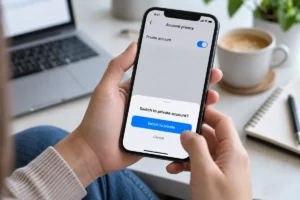
Making your profile private is the easiest way to prevent strangers and unapproved users from viewing your following list. New visitors must send you a follow request, and you can decide whether to accept them.
Follow these steps in the Instagram mobile app:
- Open Instagram and sign in to your account.
- Tap your profile picture in the bottom-right corner.
- Tap the three horizontal lines in the top-right corner.
- Select Settings and activity.
- Scroll to Who can see your content.
- Tap Account privacy.
- Turn on the Private account option.
- Select Switch to private to confirm.
Instagram sometimes changes the names or positions of menu options. If you cannot find Account privacy, use the search bar inside Settings and activity.
After you make the account private, new people must receive your approval before following you. They will not gain normal follower access simply by visiting the profile.
However, changing your account to private does not remove people who already follow you. Those users may continue viewing your private content and connections. Therefore, you should review your current followers after activating the setting.
Method 2: Remove an Existing Follower
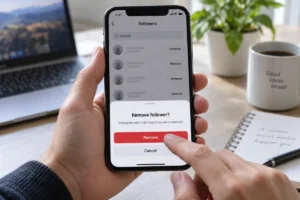
Making your account private will not help if the person already follows you. In that situation, you must remove the account from your followers.
Here is how to remove a follower:
- Visit your Instagram profile.
- Tap Followers at the top.
- Use the search bar to find the person.
- Tap Remove beside the account.
- Tap Remove again to confirm.
Instagram does not normally send a notification when you remove someone. Nevertheless, the person may notice that they no longer follow you when they visit your profile.
This method only provides meaningful privacy when your profile is private. If your profile remains public, the removed person can still visit it and access publicly available information. They may also follow you again without waiting for approval.
For better protection, make your profile private first and then remove unwanted followers. Any removed person will need to send a new follow request, which you can reject.
Method 3: Block a Specific Instagram User
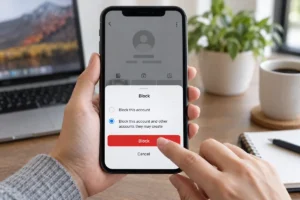
Blocking offers the strongest option when you want to hide your following list from one particular account. It also prevents that account from interacting with your profile in the normal way.
Follow these steps:
- Open the person’s Instagram profile.
- Tap the three dots in the top-right corner.
- Select Block.
- Choose whether to block only that profile or other accounts the person may create.
- Confirm your decision.
Instagram does not notify someone when you block them. However, they may realise what happened because your profile will no longer appear normally in search or previous conversations.
Blocking prevents the selected account from viewing your profile, posts, Stories and connection lists. However, the person may still use a different account. Keeping your profile private adds another layer of protection against unknown or newly created profiles.
You can unblock someone later through the Blocked section in your settings, but unblocking does not automatically restore the previous follower relationship.
How to Hide Your Following List from One Person
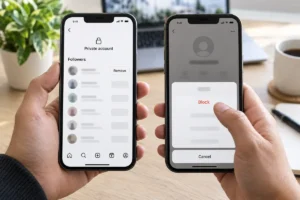
Many users want to hide their following list from one person without changing anything for everyone else. Unfortunately, Instagram does not provide a list-visibility control for individual followers.
You have two practical choices:
- Block the person.
- Make your account private and remove that person as a follower.
Blocking provides stronger protection because the selected account loses access to your entire profile. Removing a follower offers a less noticeable solution, but it only works properly when your profile is private.
The Restrict feature does not solve this problem. A restricted user may still access your profile according to its normal privacy settings. Restriction mainly changes comments, messages and activity-related interactions.
How to Hide Following List on Instagram Without a Private Account
You cannot completely hide your following list while keeping a standard Instagram account public. Instagram does not offer a public-profile setting that makes the list invisible to everyone.
On a public account, removing a follower is not enough. The person can visit your profile without following you. Restriction, muting and Close Friends also do not hide the list.
Blocking is the only practical method for preventing one particular account from viewing your public profile. However, blocking users individually does not provide general privacy, and another unblocked account may still access your public information.
If you need a public profile for business, content creation or personal branding, consider creating a second private account. Use the public account for professional posts and the private account for family, friends and personal connections.
This separation helps protect sensitive connections without reducing the reach of your public profile.
Does Restricting Someone Hide Your Following List?
No. Restricting an Instagram account does not hide your followers or following list.
The Restrict feature mainly affects interactions. For example, comments from a restricted person may remain hidden from other users until you approve them. Their messages may also move to Message Requests, and they may not see whether you have read them.
However, restriction does not remove the person as a follower, hide your profile, or change the normal visibility of your following list. If your account is public, the restricted person may still access public profile information. If they are an approved follower of your private account, they may retain follower access.
Use Restrict when you want to reduce uncomfortable interactions without immediately blocking someone. Use removal or blocking when your main concern is profile visibility.
Do Close Friends, Mute or Story Controls Hide the List?
Close Friends, muting and Story controls serve different purposes. None of them hides your following list.
Close Friends allows you to share selected Stories or other supported content with a smaller group. It does not limit access to your followers or following list.
Muting changes what you see in your own feed. When you mute someone, Instagram may stop showing you their posts, Stories or notes. Muting does not change what that person sees on your profile.
Similarly, hiding a Story from someone only prevents them from seeing that Story. It does not remove them from your followers or block access to your following list.
Use each feature for its intended purpose:
| Instagram feature | What it controls |
|---|---|
| Private account | Access from non-followers |
| Remove follower | Access from an existing follower |
| Block | Access from a particular account |
| Restrict | Comments and messages |
| Close Friends | Audience for selected content |
| Mute | Content appearing in your feed |
| Hide Story | Visibility of your Stories |
Can People See Who You Recently Followed?
Instagram does not provide other users with a clear chronological record showing exactly when you followed each account. The order in which profiles appear may depend on mutual connections, relevance, interactions and Instagram’s internal systems.
However, this does not make new connections completely private. Someone might notice an account by checking your list regularly, viewing mutual followers or seeing your likes and comments on public content.
If a connection needs to remain private, avoid relying on list order. Instead, follow the account from a carefully managed private profile and review who has access to that profile.
Remember that your interactions on public accounts may remain visible even when your own profile is private. Privacy settings cannot hide activity that appears directly on another person’s public content.
Why Can’t I See Someone’s Following List?
Sometimes, a following list may appear empty, limited or unavailable. Several possible reasons can explain this:
- The profile is private, and you are not an approved follower.
- The account owner removed or blocked you.
- Instagram temporarily limited your access.
- The account has been deactivated or suspended.
- The user changed their username.
- Your Instagram application has a temporary problem.
- Instagram detected unusual activity.
- The connection or application failed to load the list correctly.
An unavailable list does not prove that the account owner found a secret hiding feature. Instagram may temporarily restrict access to prevent spam, scraping or suspicious activity.
Update the application, check your internet connection and try again later. Avoid using automated follower tools because they may trigger security restrictions or place your account at risk.
Can a Professional Instagram Account Be Private?
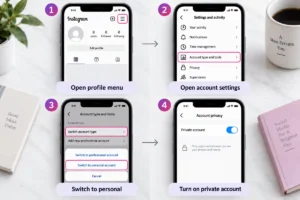
Professional accounts generally need to remain public. If you use a Business or Creator account and cannot activate the private setting, you may need to switch back to a personal account.
Use these steps:
- Open your Instagram profile.
- Tap the three-line menu.
- Open Settings and activity.
- Find the professional account settings.
- Select Switch account type.
- Choose Switch to personal account.
- Confirm the change.
- Return to Account privacy.
- Activate Private account.
Switching to a personal profile may remove access to professional features such as insights, advertising tools and certain contact options. Consider these changes before switching.
If professional tools matter more than complete privacy, keep your business profile public and create a separate private account for personal connections. You can also improve your public-facing profile with these Instagram bio ideas for creators, businesses and personal accounts.
Avoid Third-Party Apps That Promise to Hide Your List
Some applications and websites claim they can hide your following list without making the account private. Others promise to reveal private profiles or show secret follower activity.
Avoid these services. A third-party app cannot safely add an Instagram privacy control that the platform itself does not provide.
Never share the following information with an unknown service:
- Your Instagram password
- Login verification codes
- Two-factor authentication codes
- Recovery codes
- Email account password
If you have already connected a suspicious application, change your password immediately. Review recent login activity, remove unknown devices and enable two-factor authentication.
Instagram may also limit or suspend accounts that use unsafe automation services. Official privacy features remain the safest choice.
Best Method for Each Situation
The best solution depends on what you want to achieve:
| Your goal | Best method |
|---|---|
| Hide the list from strangers | Make your account private |
| Hide it from an existing follower | Make the account private and remove them |
| Hide your whole profile from one person | Block the account |
| Keep a business profile public | Use a separate private account |
| Limit unwanted comments or messages | Restrict the account |
| Share Stories with selected people | Use Close Friends |
| Hide only the following count | No official option is available |
| Hide the list while staying public | Not available for all visitors |
For most personal accounts, the best combination is a private profile with a carefully reviewed follower list.
Final Thoughts
Learning how to hide following list on Instagram is mainly about choosing the correct privacy method. Instagram does not offer a single switch that hides the list while leaving everything else unchanged.
Make your account private if you want to prevent strangers from viewing your connections. Next, review your existing followers and remove anyone who should no longer have access. Block a particular account when you need stronger protection.
Avoid misleading third-party apps and secret-setting claims. Instagram’s private-account, follower-removal and blocking tools provide the safest practical methods for controlling who can see your profile and connections.
For more Instagram tips, privacy explanations and social media tutorials, explore our latest tech and how-to guides.
FAQs
Can I completely hide my following list on Instagram?
No dedicated setting completely hides the list from everyone. A private account hides it from unapproved users, while approved followers may still have access.
Can I hide my following list from one follower?
Instagram does not offer an individual list-visibility setting. Make your profile private and remove that follower, or block the account.
Will someone know if I remove them as a follower?
Instagram does not normally send them a notification. However, they may notice that they no longer follow you when they visit your profile.
Does Restrict hide followers and following?
No. Restrict mainly affects comments, direct messages and interaction visibility. It does not hide your connection lists.
Can I hide my following list but keep my account public?
Instagram does not currently provide that option for all visitors. You can only block particular accounts or use a separate private profile.